
Guide to using Grant Tracker to submit an application
A how-to guide to using Grant Tracker.
Open funding calls
Our open funding schemes are featured on our website and will be available on Grant Tracker when the round is open and we are accepting new applications.
Everyone involved in the application will need a Grant Tracker account, including applicants, co-applicants, department heads and research office signatories. All those active in the grant, ie. applicants, co-applicants and co-investigators should input their CVs onto Grant Tracker and ensure that it is kept up to date.
New users
- To set up your account, go to https://grants.bloodcancer.org.uk/Login.aspx and select 'Register.'
- Enter your email address and then follow the instructions for adding further address details. Please ensure this is as complete as possible.
- You'll receive an automated email confirming that your information is being forwarded to our administrators for approval.
- Once approval has been given, you'll receive another email containing a unique password and a link to lead you back to the grant tracker pages.
- On entering your email address and allocated password please do so directly and don't cut and paste this information. Remember the password is case sensitive.
- Once you've accessed the system, you can change your details and choose a new password.
Registered users
Log in with your email and password. Your account will enable you to:
- Update your personal details;
- Manage your grant;
- Start a new application;
- Edit an existing application.
On the Grant Tracker site
Your personal details
This is unique to you and will be retained by the system. Once you've entered your CV details via the 'Manage my details' section (not necessary for research office signatories) it will be retained for use in all future applications. You can update the information at any time so that all your applications will have the latest details.
The application
By following the application link you'll see what application types are available to you. Each application type has information and guidelines attached. You'll see a personal home page that tracks applications or co-applications you're involved with and also those you've submitted in the past. You'll be able to see (but not edit) previously submitted applications.
Submission process
Each round of our funding schemes has its own ‘guidance document for applicants’. Please ensure that you read the guidance in full and comply with all the conditions of application prior to submitting your application.
All steps in the process must be completed by the application deadline including the approvals from the head of department and finance officer.
Troubleshooting
One of the problems applicants encounter is the inability to move through the submission process. This can occur for two reasons:
- The application has been locked by a user. This means that the previous user has not exited the application via the buttons on the left hand side menu: 'save', 'close' and 'logout'. If you think this has happened, go into the application and click ‘edit’. You'll then get a prompt to log off the locking user. You should then 'save' and 'close'. The application will now be unlocked and can move forward.
- Signatories are unfamiliar with the system. When a co-applicant, fellow, research office manager or department head are linked they'll receive notification by email.
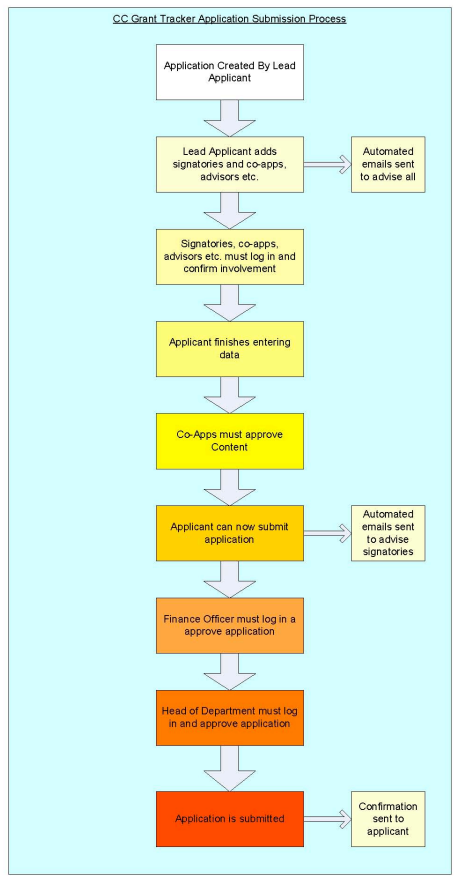
There are then two steps:
- Agreement to participate in the application;
- Approval of the application as it approaches submission.
If either of these steps aren't carried out, then the application won't move forward. The ‘co-applicant’ is particularly important here as they need to ‘participate’ and ‘approve’ before the main applicant can validate and submit.
The head of department and research office signatory need to ‘participate’ prior to the applicant submitting and will approve after the main applicant finally presses the ‘submit’ button.
To check for this, go to your applications, click on the relevant application and then check on the left hand side for ‘sign off status’. This will tell you who has confirmed participation and who has and hasn't approved it.
‘Validate’: This will highlight any incomplete or incorrect sections in the application. The application will not be able to be submitted until all sections are complete.
‘Submit’: When the applicant has submitted the application it goes to the Head of Department for final approval and then to the Head of Research Office for final approval. Following this it will be automatically received by Blood Cancer UK's Research Office.
Acknowledgement of receipt will be sent by email.
Need further guidance?
If you need any further support navigating Grant Tracker, the Research team is on hand to help.